Marketing performance depends on data integrity. When your CRM is cluttered with duplicate contact records and disjointed lifecycle histories, your KPI reporting breaks down. Customer acquisition cost calculations become unreliable, revenue attribution splits across multiple timelines, and business development representatives (BDRs) lose valuable context when reaching out to active prospects.
Maintaining high data quality across your marketing engine requires a structured approach to deduplication. HubSpot’s built-in data management tools provide automated options to clean up databases, but consolidating records without a clear review strategy can create unforeseen operational disruptions. Hubspot release additional data merge preview features in June 2026 that make data management even easier. Understanding how to merge contacts in HubSpot properly ensures your team preserves historical tracking, protects active pipeline stages, and delivers dependable metrics to leadership.
The Strategic Impact of CRM Data Quality on Marketing KPIs
Every marketing decision relies on the clarity of your reporting pipeline. Duplicate records quietly drain operational efficiency by fragmenting touchpoint histories across multiple entries. When a prospect downloads a top-of-funnel white paper using a personal email and later requests an enterprise demo with a corporate address, marketing automation tools often generate separate contact records.
Without proactive deduplication, multi-touch attribution reports fail to credit the initial campaign. This misleads marketing leadership into underfunding high-performing awareness channels while inflating conversion costs. Maintaining strict CRM data management practices prevents fractured attribution and ensures every dollar spent is accurately accounted for on executive dashboards.
Customizing Your Contact Record Merge Preview
HubSpot includes a record merge preview tool designed to give administrators visibility before combining two profiles. Instead of relying solely on default properties like name and email address, marketing teams should configure custom preview properties tailored to their reporting needs.
When evaluating contact records for deduplication, I suggest you configure your preview window to display these key properties:
- Contact Owner: Identifies whether a BDR or sales representative is actively nurturing the person, avoiding accidental reassignments.
- Record Source: Reveals how the profile entered your database, such as through paid ad conversions, API syncs, or manual uploads.
- Original Traffic Source: Preserves first-touch marketing attribution so campaign reporting remains accurate after the merge.
- Last Activity Date: Displays the most recent engagement, including email opens, page views, or completed form submissions.
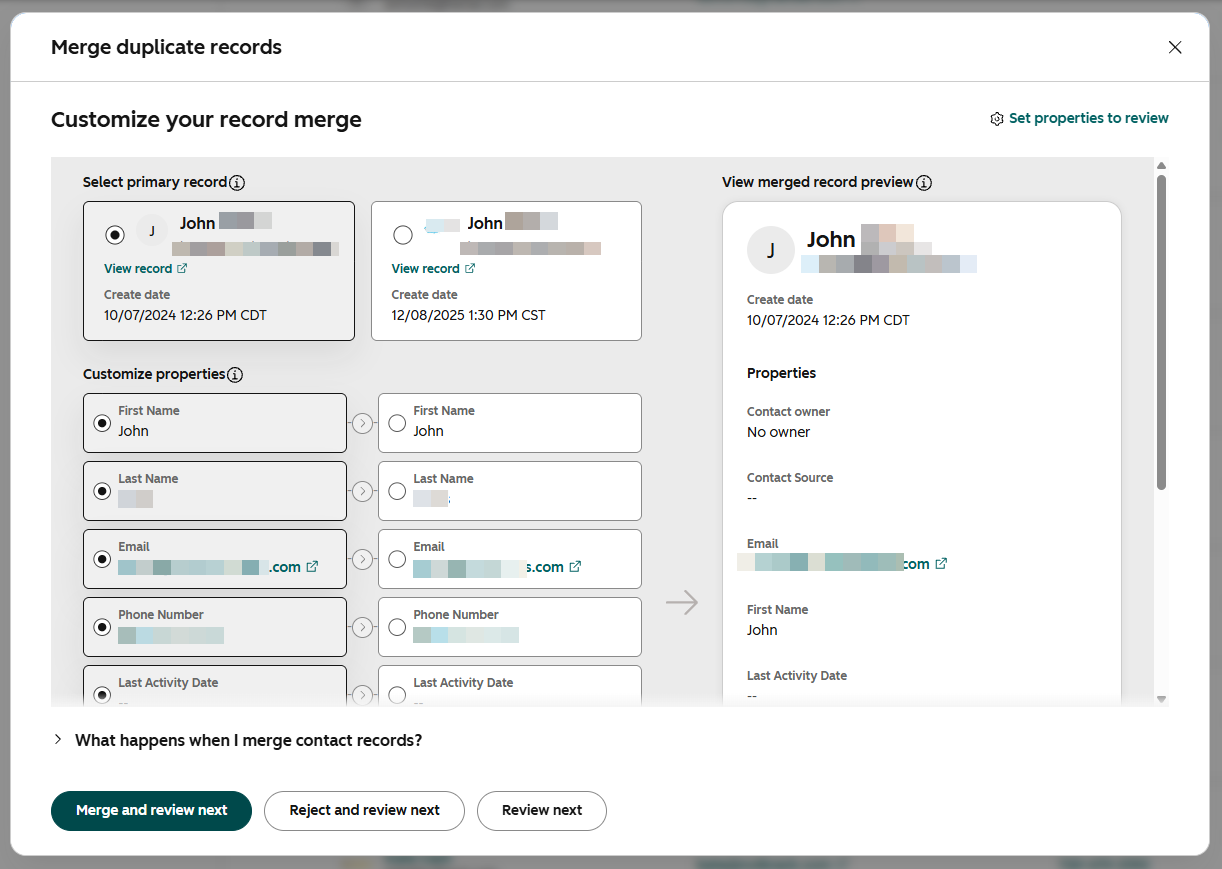
Reviewing these properties allows you to gauge the operational risk of a merge. If a duplicate profile has no assigned owner and shows no recent activity, the risk of data collision is minimal. Conversely, if both records show recent interactions across different campaigns, your team must carefully select the primary record to preserve the correct attribution pathway. For growing organizations, establishing structured operational support can help teams navigate complex HubSpot data workflows safely.
Navigating Company Merges and Multi-Object Complexity
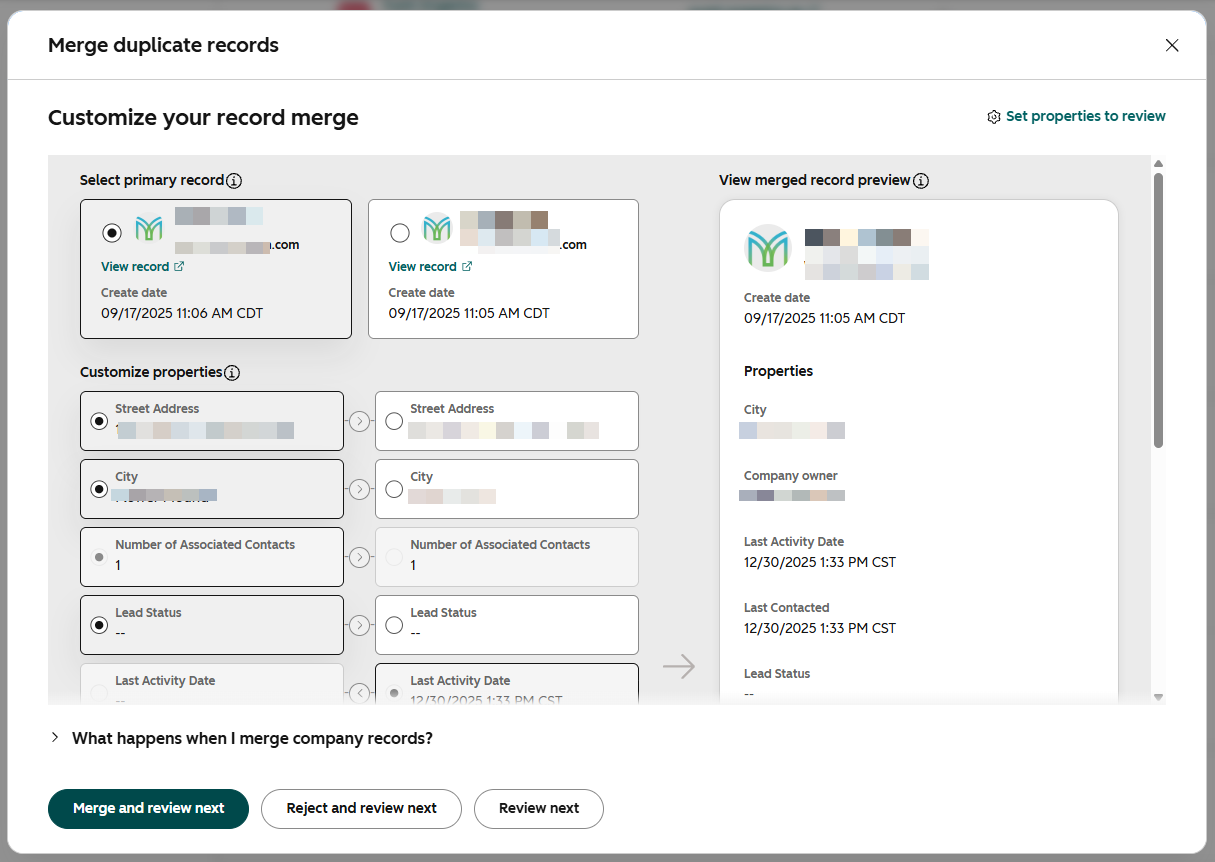
Merging company records carries higher complexity than merging individual contacts. Companies house multiple associated records, including subsidiary contacts, historical deals, and may be automatically updated by custom integrations.
When you merge two companies, HubSpot automatically re-associates all contacts and deals from both profiles to the primary company record. However, you must account for several structural factors before finalizing the consolidation:
- Associated Deals vs. Lead Objects: While HubSpot’s merge review interface allows administrators to see the number of associated deals tied to each company, it does not currently display associated lead object records. If your sales team leverages the lead object for prospecting, verify those relationships manually before merging.
- Third-Party Integrations: Merging records can change internal object IDs. If your tech stack syncs HubSpot with ERP systems, billing software, or external databases, ensure the primary record maintains the sync identifier required by external platforms.
- Company Ownership: Overwriting a company owner during a merge can inadvertently reassign active accounts and disrupt targeted BDR outreach.
To minimize risk when merging companies, adjust your review layout to compare the number of associated deals, company owner, last activity date, record source, and original traffic source. Maintaining alignment across these properties prevents sales confusion and keeps your lead pipeline management organized.
Protecting BDR Alignment and Automated Workflows
Data deduplication is not merely an administrative cleanup task; it directly impacts go-to-market execution. When contact or company ownership is inadvertently altered during a merge, automated routing workflows can fire incorrectly, sending duplicate notifications or assigning tasks to the wrong representative.
HubSpot’s June 2026 data quality updates introduced expanded cleanup automation for orders, products, and custom objects, alongside custom duplicate detection rules. Marketing and revenue operations leaders should use these features to establish proactive data validation rules at entry points, preventing duplicates before they reach active outreach queues.
Building a Dependable Foundation for Growth
Clean data drives dependable marketing insights.
By establishing clear criteria for contact and company merges, customizing preview properties, and protecting multi-object associations, marketing leaders can eliminate reporting blind spots. A disciplined approach to HubSpot data hygiene ensures your leadership team makes strategic budget and campaign decisions based on accurate, actionable metrics.